Elk Grove Community Mesh Network (MeshCore)
A personal community project to build resilient, off-grid messaging coverage across Elk Grove, CA.
What I'm Building
I'm building a local MeshCore mesh network in Elk Grove, California. It's made up of small radio nodes and repeaters placed at good, high locations (homes and businesses) to create neighborhood-scale coverage. The goal is a resilient communications layer that can still work even if cell service or the internet is unavailable.
What is MeshCore?
MeshCore is software for off-grid, text-based communications using LoRa-capable devices. It allows messages to hop from device to device across the network, so coverage improves as more nodes and repeaters join.
What it's good for
- Off-grid communication when cell service is weak or unavailable
- Emergency preparedness and disaster-resilient messaging
- Events / outdoor activities that benefit from local coverage
- Community resilience by placing repeaters in strategic locations
Tip: If you want to join the Elk Grove mesh, your device needs to match the same radio settings shown below.
Elk Grove Radio Settings
To communicate on the same MeshCore network, devices must match the same radio settings (frequency + LoRa parameters). Here are the current Elk Grove settings:
| Setting | Value |
|---|---|
| Preset | Custom |
| Frequency | 910.525 MHz |
| Bandwidth (BW) | 125 kHz |
| Spreading Factor (SF) | 10 |
| Coding Rate (CR) | 5 |
| Transmit Power | 20 dBm |
Why 910.525 MHz?
I'm using 910.525 MHz as a consistent "meet here" frequency for the Elk Grove mesh. Keeping one known frequency makes it easier for new nodes to join and keeps the local network coordinated. (For U.S. LoRa devices, this sits within the 902–928 MHz ISM band.)
Why these LoRa settings?
- 125 kHz bandwidth + SF10 is optimized for range and broad hardware compatibility. This combination works reliably across all common LoRa devices, including budget hardware, and holds up across Elk Grove's wide temperature range (hot summers, cool winters).
- Coding Rate 5 is a practical balance between reliability and efficiency.
- 20 dBm helps fixed repeaters maintain stronger links for wider city coverage.
These settings are chosen for long-term stability. All current and future repeater hosts can configure once and expect them to remain consistent.
Private Channels — Keep Your Family Connected
Joining the Elk Grove mesh puts you on a shared network — anyone with the same radio settings can send and receive public messages. But MeshCore also supports private channels: encrypted groups that only your trusted circle can read. This is the feature that makes the mesh genuinely useful for personal emergency preparedness.
How it works
A private channel is a named group secured with an encryption key that MeshCore generates automatically when you create the channel. Only devices that have been added to that channel can decrypt and see the messages.
Think of the mesh as an envelope courier — it moves your sealed letters across the city without opening them.
Two layers of access control
| Layer | What must match | Controls |
|---|---|---|
| Radio | Frequency, BW, SF, CR | Who can receive the packets at all |
| Channel | Channel name + auto-generated key | Who can read the packets |
Devices that have not been added to your channel will relay your packets across the mesh but cannot decode them. Devices on a different frequency or spreading factor will not receive them at all.
Why this matters for community members
In a real emergency — wildfire evacuation, power outage, earthquake — cell networks typically fail or become overloaded within minutes. A private channel on the Elk Grove mesh gives your household a dedicated communication line that:
- Works completely off-grid — no cell service or internet required
- Reaches across the city via the mesh repeater network
- Is private — neighbors and other mesh users cannot read your messages
- Runs on hardware that costs $25–$40 per device
- Works even while the public mesh is busy with other traffic
How to set up a private channel for your group
- Each member of your group gets a node configured with the Elk Grove radio settings above.
- One person creates the private channel in the MeshCore app — just choose a name, like
NEIGHBOURS-01. MeshCore automatically generates the encryption key. - Share the channel with the rest of your group — MeshCore provides a way to export and share channel details so others can import it on their devices.
- Test it before you need it — send a message from one device and confirm the others receive it.
⚠️ Important: Share your channel details out of band — in person, by phone, or by text — before an emergency occurs. Anyone who receives the channel details can read your traffic, so only share with people you trust.
Multiple channels can coexist
The mesh supports many private channels running at the same time. Your group's channel, a neighbor's channel, and the shared community channel all ride on the same radio network simultaneously. None of them can read each other's traffic.
Note: Private channel messages still use shared airtime on the network. During emergencies, keep messages purposeful to help keep the network available for everyone.
Devices + How to Use a Node
To join the Elk Grove MeshCore network, you'll need a compatible LoRa device (a "node") and the MeshCore app. Once configured with the same radio settings listed above, you can send and receive text messages across the mesh.
What is a "node"?
A node is a small LoRa radio device that participates in the mesh. Some nodes are handheld/pocket devices, some are mounted in vehicles, and some are fixed repeaters placed high (roofline) to extend coverage for everyone.
Recommended device types
- Pocket / Personal Node: Small handheld device you carry (best for individuals and community members).
- Vehicle Node: A node with a roof antenna for better coverage while driving.
- Repeater Node: A fixed node placed high (roofline) to extend coverage for everyone.
Suggested Hardware
Not sure what to buy? Here are some good starting points for each use case:
| Use Case | Device | Approx. Cost |
|---|---|---|
| Pocket / Personal | RAK WisBlock Starter Kit (19007) | ~$35 |
| Vehicle | Heltec LoRa32 V3 + mag-mount antenna | ~$25 + antenna |
| Rooftop Repeater | RAK WisBlock + weatherproof enclosure + solar | ~$60–80 |
Not sure which is right for you? Contact me and I'll help you pick based on your budget and situation.
Ready to connect? Follow the steps below to join the Elk Grove mesh network.
How to join the Elk Grove mesh (quick start)
- Get a compatible MeshCore/LoRa device (see suggestions above, or contact me for a recommendation).
- Install the MeshCore app/client on your phone/device.
- Pair your device (usually over Bluetooth) and open the device settings.
- Set the radio settings to match the Elk Grove Radio Settings on this page:
- Frequency: 910.525 MHz
- Bandwidth: 125 kHz
- Spreading Factor: 10
- Coding Rate: 5
- Transmit Power: 20 dBm
- Choose a node name (example:
POCKET-01orVEHICLE-01). - Send a test message and confirm you see traffic when you're in range of a repeater.
Tips for better performance
- Height matters: Higher placement usually improves range.
- Outdoor is best: Indoors can reduce range (walls/metal/low-e glass).
- External antenna helps: Vehicle and fixed nodes benefit most.
- Be patient: Mesh networks improve as more nodes are added.
If you're new to LoRa, I'm happy to help you pick a device and verify your settings.
Current Network Coverage
The map below shows current repeater locations and approximate coverage areas. As additional nodes are added at higher elevations, overall coverage and reliability improve.
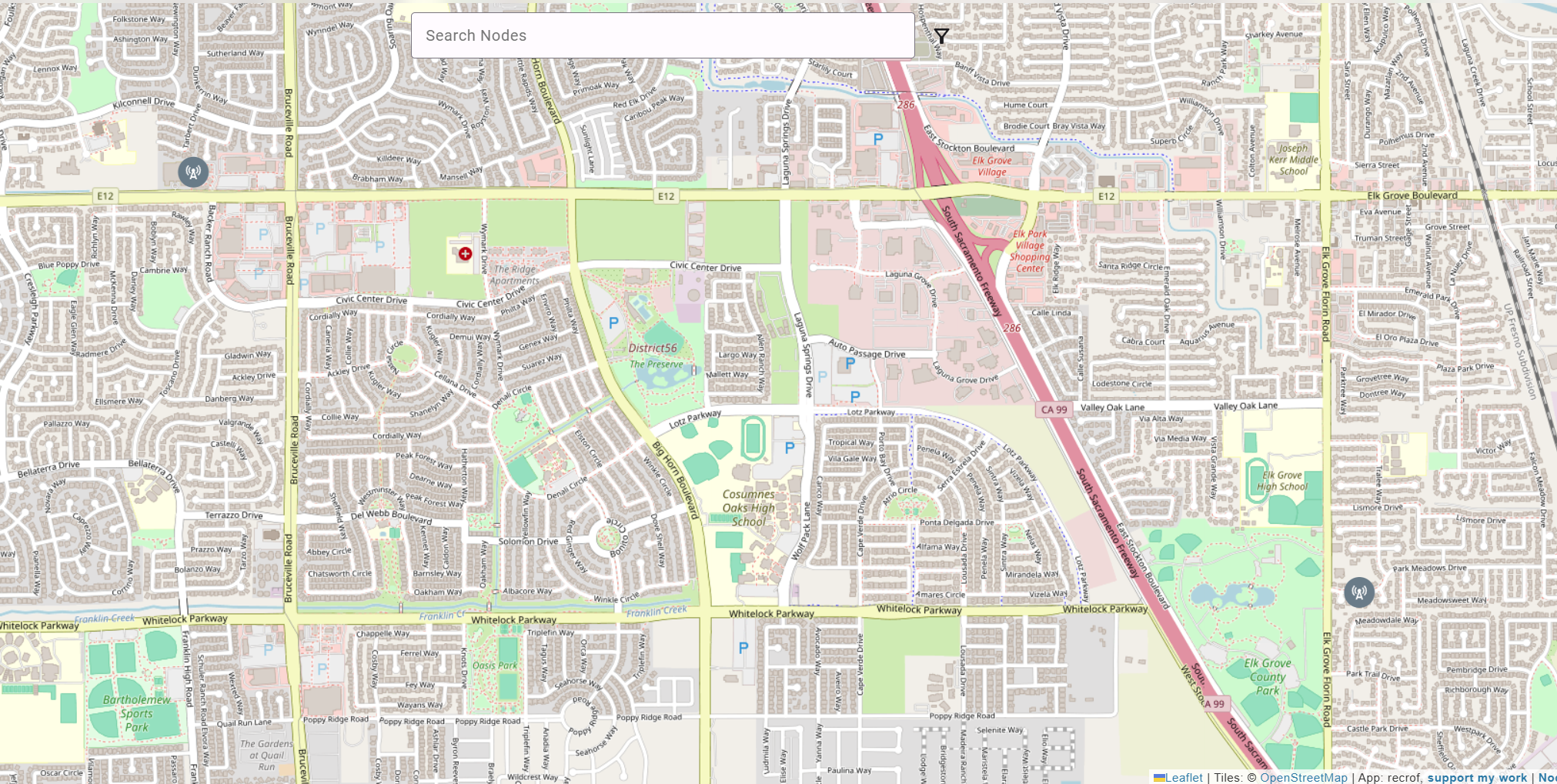
Shaded areas indicate approximate repeater coverage. Exact node locations may be slightly adjusted for security and privacy. Coverage improves as additional repeaters are added.
Interested in Hosting a Rooftop Repeater?
I'm looking for local businesses (and homeowners) willing to host a small, solar-powered repeater on a roof or other high point. Hosting a node helps expand coverage for the entire area and supports a community-run communications network.
What hosting involves
- Small, weatherproof device mounted on a roof or other high point
- Solar powered (no power usage from your building)
- Does not connect to your internal network or internet
- Low-profile antenna (similar to a Wi-Fi or radio antenna)
- I handle installation, maintenance, and removal if needed
Why participate?
- Improves local coverage and reliability
- Helps during outages/emergencies when normal comms are limited
- Optional, free, and non-commercial
Supporting the Project
EGMESH.NET is currently funded personally by me. All repeaters, equipment, antennas, and solar hardware are purchased out of pocket.
As the network grows, additional repeaters and higher-elevation placements significantly improve coverage and reliability. If you'd like to help expand the Elk Grove mesh network, there are several ways to contribute.
Ways to Support
- Host a repeater at your home or business
- Contribute hardware (LoRa devices, antennas, enclosures, etc.)
- Financial contribution toward repeater equipment
Support is completely optional and appreciated — this remains a non-commercial, community-focused initiative.
Transparency note: Contributions go toward hardware and deployment costs only.
Frequently Asked Questions
Does this connect to my Wi-Fi or business network?
No. The repeater is completely independent and does not connect to your internal network or internet.
Will it interfere with my Wi-Fi or other devices?
No. LoRa operates at 910 MHz, a completely separate radio band from Wi-Fi (2.4 GHz and 5 GHz). There is no interference with your existing wireless equipment.
Does it cost me anything?
No. The repeater is solar powered, and I handle installation and maintenance.
Is this a camera or surveillance device?
No. It's a LoRa radio node for text-based messaging — no audio or video recording capability.
What if I change my mind?
The equipment can be removed at any time upon request.
Can other people on the mesh read my messages?
Not if you use a private channel. Public channel messages are readable by any device with matching radio settings. Private channel messages are encrypted with a key only your group holds — repeaters and other users relay the packets but cannot decode them.
Can the network operator read my private channel messages?
No. Private channel traffic is encrypted end-to-end using a key generated by MeshCore when the channel is created. The repeater nodes — including those operated by EGMESH.NET — forward packets without being able to read their contents.
Do I need special hardware for a private channel?
No. Private channels are a software feature built into MeshCore. Any device already configured for the Elk Grove mesh can use private channels — no additional hardware required.
Can I have a private channel with just one other person?
Yes. A private channel can be shared between two people or a larger group — whoever you choose to share the channel details with.
Is my channel encryption key stored anywhere on the network?
No. The encryption key never leaves your device. It is not transmitted over the air or stored on any repeater or server. If you lose access to your channel, you would need to create a new one and share the details with your group again.
About Me
I'm a local Elk Grove resident with over 25 years of experience in IT infrastructure, networking, and information security.
Contact
If you're open to hosting a small, solar-powered repeater (or just want to learn more), I'd love to talk and answer any questions.
Email: [email protected]
Location: Elk Grove, CA
Website: EGMESH.NET